
Automate adding multiple destination clusters to Argo CD with External Secrets Operator
Our goal: We want to declaratively add new workload clusters to Argo CD so we can deploy to multiple destinations from a central cockpit cluster. The configuration is applied with GitOps and the External Secrets Operator is used to not expose credentials. Finally, credential rotation must be decoupled from application syncs.
The setup: Argo CD runs on a central cockpit cluster in a hub and spoke architecture alongside External Secrets Operator and other tools. During cluster registration, labels are set on each workload cluster so that ApplicationSets can deploy third party tools automatically.
In this guide we focus only on one part: how to add a new cluster to Argo CD using the External SecretsOperator.
The flow looks like this:
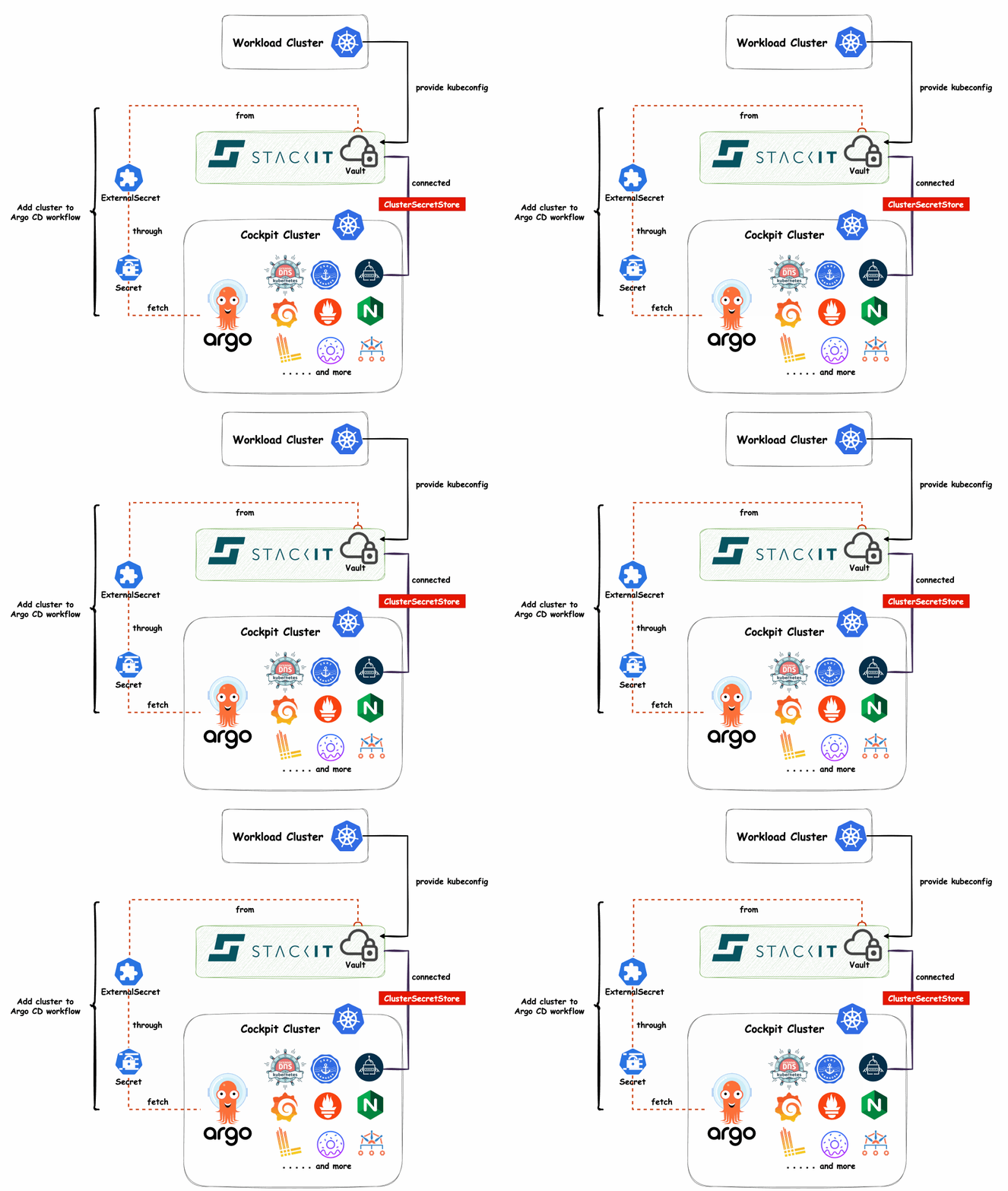
At first whenever a new Kubernetes cluster is created, its kubeconfig is stored in Vault. After that the ExternalSecret fetches the kubeconfig from Vault and creates a Kubernetes Secret. At last Argo CD reads the secret and registers a new workload cluster.
The Problem with Argo CD
At first glance, this looks simple. However designing an easy to use process is not that straightforward.
Typically a kubeconfig looks something like this:
apiVersion: v1
clusters:
- cluster:
    certificate-authority-data: LS0tLS1CRUdJTi...
    server: https://h7mzkz.c1.de1.k8s.ovh.net
  name: test
contexts:
- context:
    cluster: test
    namespace: ingress-nginx
    user: kubernetes-admin-test
  name: kubernetes-admin@test
current-context: kubernetes-admin@test
kind: Config
users:
- name: kubernetes-admin-test
  user:
    client-certificate-data: LS0tLS1CRUdJTi...
    client-key-data: LS0tLS1CRUdJTiBQUklW...
Unfortunately, Argo CD cannot read the kubeconfig structure but expects a secret in a specific format. This secret stores the connection credentials for the workload cluster in a JSON representation of the kubeconfig.
This object requires values such as:
- certificate-authority-data
- insecure flag
- client-certificate-data
- client-key-data
In addition to the certificate-based authentication you can use a bearerToken, but you can’t use both at the same time.
We could mandate that each kubeconfig must be formatted correctly before added to vault. However this is an error-prone process that would require some additional component for automation. Moreover adding a cluster and creating a cluster should be separated processes. Therefore the uploading process should not know about correctly formatting Argo CD cluster secrets.
The challenge is to fetch a yaml formatted kubeconfig from Vault and generate a kubernetes secret with correctly structured json data that Argo CD can use to register a new cluster – without relying on additional tools.
We found no solution online that met our requirements. Most people use argocd cluster add ... manually or in CI/CD pipelines.
We required a fully declarative approach with GitOps. After some time we came up with a solution that relies on tools we already have in place – External Secrets Operator and our cloud-hosted Vault.
The Solution with External Secrets
Note: Not all keys of the kubeconfig are implemented and one value is hardcoded into the template. Also you can extract only the first cluster and user with this solution. The template can be “easily” adapted to your specific requirements.
Firstly, in our Vault we create a secret with name “my_clusters” and store the kubeconfig with key “vcluster-0”. Secondly we add an ExternalSecret manifest to our GitOps repository that targets the vault secret. After that Argo CD will see the updated desired state and applies the manifest. Finally, the secret data is formatted and stored inside a kubernetes secret.
Following is the ExternalSecret manifest that fetches the kubeconfig from Vault (spec.data[0].remoteRef) and generates an Argo CD cluster secret in the argocd namespace:
apiVersion: external-secrets.io/v1beta1
kind: ExternalSecret
metadata:
  name: vcluster-0-es
  namespace: argocd
spec:
  refreshInterval: 5m
  secretStoreRef:
    kind: ClusterSecretStore
    name: controlplane-demo
  target:
    name: vcluster-0-cluster-secret
    creationPolicy: Owner
    template:
      metadata:
        labels:
          argocd.argoproj.io/secret-type: "cluster"
          cert-manager-lean: enabled
          kro: enabled
          kube-prometheus-stack-lean: enabled
      data:
        name: vcluster-0
        project: controlplane-demo
        server: "{{ $k8sconfig := .clusterCreds | fromYaml }}{{- $cluster := (index $k8sconfig.clusters 0) -}}{{ $cluster.cluster.server }}"
        config: "{{ $k8sconfig := .clusterCreds | fromYaml }}{{- $cluster := (index $k8sconfig.clusters 0) -}}{{- $user := (index $k8sconfig.users 0) -}}{{ printf \"{\\\"bearerToken\\\":\\\"\\\",\\\"tlsClientConfig\\\":{\\\"caData\\\":%s,\\\"certData\\\":%s,\\\"insecure\\\":%s,\\\"keyData\\\":%s}}\" (index $cluster.cluster \"certificate-authority-data\" | toJson) (index $user.user \"client-certificate-data\" | toJson) \"false\" (index $user.user \"client-key-data\" | toJson) }}"
  data:
    - secretKey: clusterCreds
      remoteRef:
        key: my_clusters
        property: vcluster-0
        conversionStrategy: Default
        decodingStrategy: None
        metadataPolicy: None
Once applied Argo CD automatically detects the new cluster and is able to deploy workloads to it. Each time the kubeconfig is rotated we only need to update the corresponding secret in Vault. Argo CD uses the updated cluster credentials after the configured refresh interval passed or by triggering a manual refresh. In our case we decided to create one ExternalSecret per cluster so we can better control which cluster may be registered with Argo CD. However this also means we need to create a new ExternalSecret for each cluster we add.
An alternative solution would be to have only one ExternalSecret for every cluster. With this alternative solution the process for adding new clusters would be only one step – adding the cluster secret to Vault. This doc gives you a good starting point.
How the template works in External Secrets Operator
Note: we skipped a lot of important aspects to keep this short. Make sure to have good RBAC for your Vault and kubernetes resources in place.
In spec.data we define the reference to our kubeconfig in Vault and store the retireved secret in the variable clusterCreds.
The External Secrets Operator processes the .spec.target.template.data field with the go-template engine. Standard, custom and templates from the Sprig Library are available. In this context we can work with the clusterCreds variable.
A go-template string is defined in .spec.target.template.data.config that:
- reads the yaml formatted data from the clusterCreds (the kubeconfig from Vault) and transforms it into a map:
{{ $k8sconfig := .clusterCreds | fromYaml }} - gets the first cluster and user configuration in finds in the map:
{{- $cluster := (index $k8sconfig.clusters 0) -}}{{- $user := (index $k8sconfig.users 0) -}} - prints a json formatted string in the structure Argo CD expects:
{{ printf \"{\\\"bearerToken\\\":\\\"\\\",\\\"tlsClientConfig\\\":{\\\"caData\\\":%s,\\\"certData\\\":%s,\\\"insecure\\\":%s,\\\"keyData\\\":%s}}\" - with values injceted from the cluster and user config:
(index $cluster.cluster \"certificate-authority-data\" | toJson) (index $user.user \"client-certificate-data\" | toJson) \"false\" (index $user.user \"client-key-data\" | toJson) }}"
After manifest generation the go-template string is “translated” to a json-formatted string value. The External Secrets Operator creates a secret with labels and the templated data in argocd namespace. Argo CD sees a new secret with the cluster label and registers the new cluster with connection parameters from the secret.
If you plan to use this manifest in a helm chart, the go-template strings must be escaped some more. Since helm relies on the same template engine it parses the same control characters as the External Secrets Operator does “{{ }}”.
config: "{{ `{{ $k8sconfig := .config | fromYaml }} [...] \"client-key-data\" | toJson) }}` }}"
Note the backticks (“`”) around the original string and the additional control characters as first and last characters. When a helm-chart is deployed the go-template string must not be run through the engine.
If helm tries to template the string it does not know about the clusterCreds variable. It is created later when the Operator processes the ExternalSecret Ressource.
Wrap Up: GitOps at Scale
In conclusion, running GitOps at scale in a hub and spoke architecture requires a robust and secure way to manage your clusters. This article only looked at one specific case and did not cover everything needed for a secure setup.
While the initial challenge of formatting the kubeconfig can be frustrating, the solution with External Secrets Operator and go-template provides a fully-automated workflow.
Once you’ve solved this, adding new clusters is as simple as pushing a kubeconfig to Vault. Combined with a good naming pattern for the Vault secret the rest happens automatically.
This setup allows you to manage dozens or even hundreds of clusters consistently using a true GitOps approach. It’s the difference between doing GitOps and doing GitOps at scale.
Happy automating!
Additional Informations:
About the author
A public speaker and a Senior Platform Engineer at iits-consulting. He specializes in GitOps and scaling Kubernetes platforms, with deep hands-on experience. A passionate advocate for open source, Alexander is particularly known for his expertise with Argo CD and for building reliable, secure, and scalable cloud architectures. On stage and in practice, he bridges strategy and engineering, helping teams adopt modern platform patterns and operate cloud-native systems with confidence.