While studying for the CKS I stumbled across "RuntimeClasses" in Kubernetes. A way to tell Kubernetes that I'd like to use a special container runtime configuration for a Pod's containers.
What made the topic interesting to me was the obvious follow-up question: why would I want that? And how does it work?
I originally planned to answer those questions by implementing my own containerd shim (don't worry, I'll explain what that is). A complete one turned out to be far too much for one post, so I only built the first step. Around that experiment, I'll explain why you might want more isolation than a regular container offers, how a RuntimeClass selects a runtime on the node, and how containerd and runc actually start a container.
Containers, and why you'd want more isolation
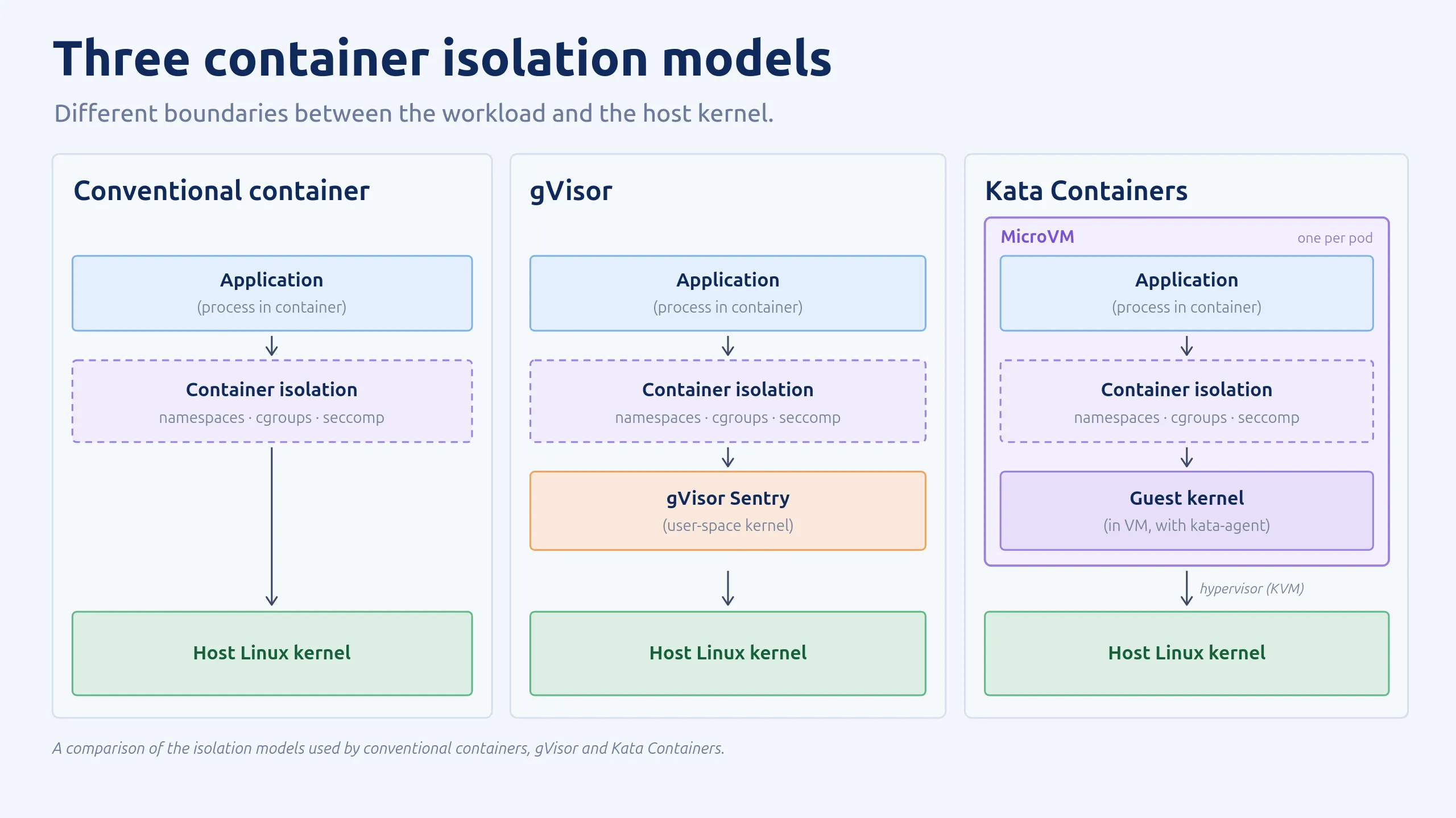
To answer the "why", it helps to look at what a container actually is. For a long time, containers were a mystery to me: something between a normal process and a virtual machine. They become a lot less magical once you dig in. Your application still runs as a normal Linux process. The isolation comes from kernel features: namespaces limit what the process can see, cgroups limit what it can use, and capabilities and seccomp limit what it's allowed to do. On top of that, the process gets its own root filesystem.
With that, the process feels like it has its own operating system. But it is still just a process on a shared kernel, and a single kernel bug or flawed isolation feature can be enough to escape to the host.
A tremendous amount of effort goes into hardening the kernel, but container escapes are possible. In April 2026, Copy Fail (CVE-2026-31431) let an unprivileged process write into the host's page cache, which on a shared kernel was enough to get from a container to root on the node. This fits nicely with defense in depth: don't assume one security boundary will always hold, and add layers where the risk justifies it.
One way to add another layer of isolation is to use an alternative container runtime. A runtime determines how a container is executed, and different runtimes can provide different isolation guarantees. Two well-known examples are gVisor and Kata Containers.
gVisor
gVisor runs a user-space reimplementation of large parts of the Linux kernel, the Sentry. The app's system calls are handled there instead of by the host kernel. The Sentry only makes a small, restricted set of host calls, which shrinks the attack surface considerably.
This design paid off with Copy Fail: gVisor sandboxes were not affected. The exploit needs the host kernel's AF_ALG crypto interface, but a sandboxed workload's system calls end up in the Sentry, so the vulnerable code in the host kernel was never within reach.
Kata Containers
Kata Containers runs each Pod in a lightweight virtual machine with its own guest kernel, adding a hardware-virtualization boundary between the workload and the host. This provides an additional layer of isolation, but comes with resource overhead and longer startup times. It also requires hardware virtualization support, which may not be available when running on cloud VMs without nested virtualization.
With Kata, Copy Fail could compromise the guest kernel, but reaching the host would still require breaking out of the VM.
Comparing isolation models
The main difference is where the isolation boundary sits. Here's a simplified comparison:
Both need a way to be selected by Kubernetes. That's where RuntimeClass comes in.
RuntimeClass doesn't implement the isolation itself. It allows a Pod to request a particular runtime, provided that runtime is configured on the node.
Let's see how this works with Kubernetes and containerd.
From RuntimeClass to containerd
After the API server accepts a new Pod, the scheduler assigns it to a suitable node. The kubelet (the Kubernetes agent on that node) then takes over. It doesn't start containers itself. It asks the node's container manager, typically containerd, to do it through a standard interface called the CRI (Container Runtime Interface). containerd runs as a daemon, usually started and managed by a service manager like systemd. So the kubelet can send it requests without having to start containerd for each new Pod.
The first thing the kubelet asks for is a pod sandbox: the shared environment that all containers of the Pod will live in. Only after that does it create the actual containers inside it, one by one.
Surprisingly (to me at least), containerd doesn't start the containers itself either. It pulls the image and prepares the filesystem and configuration, then hands the container over to a runtime: a separate program that actually creates, starts and stops it. In practice this is usually a small intermediary process called a shim, which in turn drives a low-level tool like runc. The default chain is kubelet → containerd → shim → runc → container. You can read more about this design in the containerd docs.
So how does Kubernetes get to choose which runtime to use? At its core, the key part of a RuntimeClass is surprisingly simple: a name and a handler string. The kubelet looks up the RuntimeClass referenced by the Pod's runtimeClassName and reads its handler string. It passes that string in the runtime_handler field of RunPodSandbox, the CRI request that creates the Pod's sandbox. containerd looks up the handler in its configuration and uses the corresponding runtime configuration for the sandbox and every container created inside it. That's why a RuntimeClass applies to a whole Pod, rather than individual containers.
Kubernetes has no idea what the handler means. It's just a key that the node's administrator has defined in the containerd configuration, which maps the handler name to a runtime type.
The containerd configuration on a node might look like this for containerd 2.x using configuration version 3:
[plugins."io.containerd.cri.v1.runtime".containerd.runtimes.gvisor]
    runtime_type = "io.containerd.runsc.v1"

[plugins."io.containerd.cri.v1.runtime".containerd.runtimes.kata]
    runtime_type = "io.containerd.kata.v2"
With the standard containerd runtime-v2 shim naming convention, this runtime type corresponds to the binary name containerd-shim-runsc-v1, which containerd looks up in the PATH.
If the handler isn't configured on the node, containerd can't create the sandbox and the Pod cannot start.
To avoid that, a RuntimeClass can carry an optional scheduling section with a nodeSelector and tolerations. Kubernetes merges these into the Pod during admission. Administrators label nodes that support the runtime, and the nodeSelector restricts scheduling to those nodes. Without it, Kubernetes assumes every node supports the RuntimeClass. A second optional field, overhead, tells the scheduler how much extra memory and CPU the sandbox itself needs, which matters for Kata's microVMs.
Here's how all of this fits together:
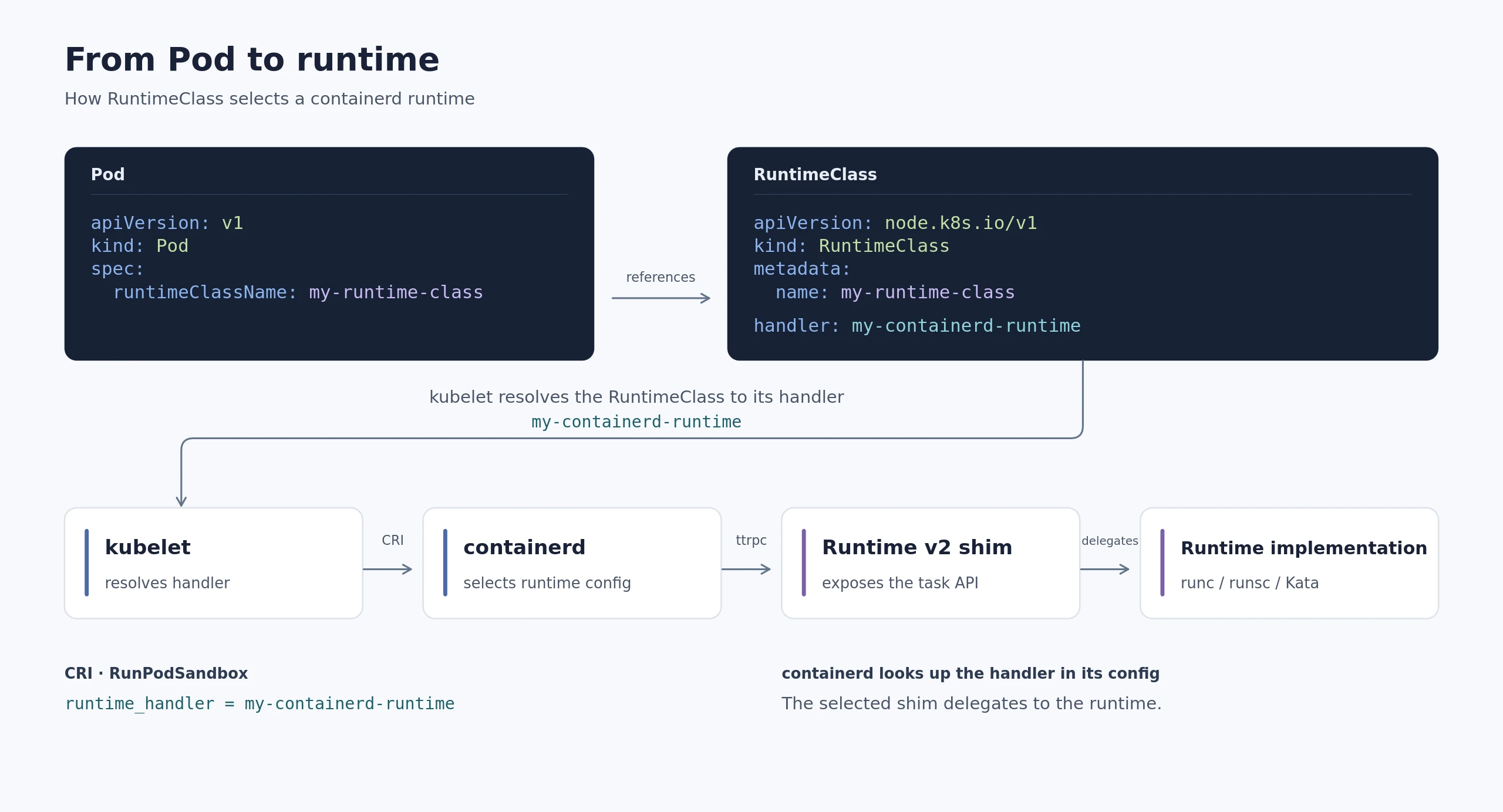
Now that we have a general overview and know how to configure containerd to use a specific runtime, let's take a closer look at how containerd interacts with the shim.
What containerd expects from a runtime
containerd talks to a shim over a Unix socket using ttrpc, a lightweight gRPC-like protocol (protobuf, but without HTTP/2). Unlike containerd, the shim is started on demand. This works through a small CLI contract:
- start: containerd runs
containerd-shim-<name> startand expects a socket address back (and some other values). The shim decides whether to spawn a new process or return the address of one that's already running, so one shim per container and one shim for many are both valid. - delete: out-of-band cleanup, used when containerd can no longer reach the shim, for example because it was killed while its container was still running.
Once containerd has the address, it sends the actual work (create, start, kill, …) as ttrpc calls.
To summarize: The shim's start command starts the shim itself. The Task API's Start method called using ttrpc starts the container process.
Experimenting by building a demo containerd shim
I wanted to see this contract in action, so I tried implementing my own containerd runtime (shim). containerd ships a skeleton shim that handles the CLI plumbing and leaves everything else as ErrNotImplemented. I filled in start, plus a trivial Delete and Shutdown in the Task API so the shim can be torn down cleanly. Everything else stayed unimplemented.
Here's the relevant startup logic (simplified Go code):
// Error handling and bootstrap response omitted.
address, _ := shim.CreateSocketAddress(
    ctx, socketDir, opts.GetContainerdGrpcAddress(),
    opts.GetInstanceID(), false,
)

if shim.CanConnect(address) {
    return address
}

// Start another copy of ourselves to serve the Task API.
cmd := exec.Command(self,
    "-namespace", opts.GetNamespace(),
    "-id", opts.GetInstanceID(),
    "-address", opts.GetContainerdGrpcAddress(),
    "-socket", strings.TrimPrefix(address, "unix://"),
)
cmd.Start()

// Wait for the socket to become reachable, then return its address.
The full code is on GitHub: PowerOfCreation/containerd-shim-experiment.
To inspect the containerd-to-shim boundary in isolation, I'll use ctr directly. This bypasses Kubernetes and CRI. For this I built my shim, put it into PATH and told containerd to use it:
go build -o out/containerd-shim-mine-v1 ./cmd

sudo cp out/containerd-shim-mine-v1 /usr/local/bin/containerd-shim-mine-v1

sudo ctr image pull docker.io/library/busybox:1.37

sudo ctr run --rm --runtime io.containerd.mine.v1 -t docker.io/library/busybox:1.37 test sh
(By the naming rule from above, io.containerd.mine.v1 resolves to containerd-shim-mine-v1.)
The result:
ctr: failed to create shim task: not implementedSo, what happened? containerd called my shim, which spawned a second instance of itself and handed back its address. containerd then connected via ttrpc, but none of the ttrpc methods to actually create a container are implemented yet, hence the error not implemented. This means the start sub-command worked, including the self-spawn. To double-check, I changed start to return ErrNotImplemented, and got a different error:
ctr: failed to start shim: start failed: io.containerd.mine.v1: not implemented: exit status 1A working shim would now have to implement the rest of the Task API (I/O streams, exit events, signals, …), which was too much for this experiment. So I'll skip that part and look at what it would end up doing. The default shim uses runc to start a container, so let's take a look at how runc works.
Understanding runc
Running runc gives us our first clue how it works.
runc is a command line client for running applications packaged according to
the Open Container Initiative (OCI) format and is a compliant implementation of
the Open Container Initiative specification.
[...]
Containers are configured using bundles. A bundle for a container is a directory
that includes a specification file named "config.json" and a root filesystem.
The root filesystem contains the contents of the container.
The root filesystem can be pretty much any directory. Usually it contains the directories you would expect from a Linux distribution, like /etc or /home. Distroless images just contain the application and its runtime dependencies, without the usual shell and package manager.
For a small userland, I'll reuse the BusyBox image from before. containerd normally prepares the container's root filesystem through a snapshotter. For this manual runc example, I'll mount the image and copy its contents into our bundle's rootfs directory:
# Extract the root filesystem of the busybox image to ~/mybundle/rootfs
mkdir -p ~/mybundle/rootfs
sudo mkdir -p /mnt/busybox
sudo ctr image mount docker.io/library/busybox:1.37 /mnt/busybox
sudo cp -a /mnt/busybox/. ~/mybundle/rootfs/
sudo ctr image unmount /mnt/busybox
Running ls ~/mybundle/rootfs shows the base filesystem that our BusyBox container will use. That's much of the magic behind containers looking like different Linux distributions: the image supplies the userland, while conventional runc-based containers use the host's kernel. This lets a Debian or Alpine userland run on a different Linux distribution, provided the CPU architecture and required kernel features are compatible. That shared kernel also explains the security concern from the beginning: an exploitable host-kernel vulnerability can compromise container isolation.
Now let's create the specification file. For this, the default one is enough and can be generated by running runc spec in the new ~/mybundle directory. After running the command, there is a config.json file next to the rootfs directory. That's everything I need to run this container manually. From the bundle directory, I can now run sudo runc run mybusybox and the busybox container is successfully started!
# Explore the container's filesystem
sudo runc run mybusybox
/ # ls
bin    dev    etc    home   lib    lib64  proc   root   sys    tmp    usr    var
Now let's take a deeper look at what is actually contained in the config.json. Here is an abbreviated overview of some of the fields:
{
  "process": { "args": ["sh"], "capabilities": { "bounding": ["CAP_KILL", "..."] } },
  "root": { "path": "rootfs" },
  "linux": { "namespaces": [{ "type": "pid" }, { "type": "network" }, { "type": "mount" }, "..."] }
}
As you can see, it gives runc instructions such as which directory to mount as the root filesystem, which command the container should start with, or which capabilities it should have. This is something you usually would configure in Kubernetes. It gets passed down to containerd, which generates this configuration file and prepares the bundle. The shim then uses that bundle to invoke runc.
By the way, runc run was a simplification. Your typical shim calls lower-level commands directly instead: runc create prepares the container without starting the application, and runc start executes the configured program. This is exactly the split you'll find in containerd's task API as Create and Start. containerd prepares the bundle and passes its path along in the Create request. The shim then has to translate the two calls into runc create and runc start.
Putting it all together
So here's how the pieces fit together when we use kubectl apply to create a new Pod:
- The API server accepts the Pod. During admission, any scheduling constraints and resource overhead defined by its RuntimeClass are added to the Pod before it is stored in etcd.
- The scheduler assigns the Pod to a node. It considers those constraints alongside the Pod's other requirements.
- The node's kubelet looks up the RuntimeClass. It reads the handler string, which identifies a runtime configuration on that node.
- The kubelet asks containerd to create the Pod sandbox. This CRI call is named
RunPodSandbox, and it includes the handler string. containerd selects the matching runtime configuration and sets up the Pod's shared environment. - The kubelet then asks containerd to create and start the containers inside that sandbox. These are separate CRI calls, named
CreateContainerandStartContainer. They refer to the existing sandbox, so containerd already knows which runtime to use. - containerd manages execution through the selected runtime's shim. It starts or reuses a shim as needed and sends lifecycle requests through its Task API. For the default runtime, the shim translates container creation and startup into
runc createandrunc start.
The same Kubernetes workflow can therefore lead to different execution environments:
- runc: The application runs as an isolated process on the host kernel, using namespaces, cgroups and other settings from the OCI configuration.
- gVisor: The shim uses runsc to run the application in a sandbox where the Sentry handles its system calls.
- Kata Containers: The Pod sandbox is backed by a lightweight VM. An agent inside that VM creates and starts the containers on its guest kernel.
RuntimeClass connects the Pod's runtime choice to a handler configured on the node. Kubernetes requests a sandbox and containers, but the selected runtime determines how they are isolated and executed.
About the author
Niklas Werner is a DevOps/Cloud Engineer at iits-consulting, where he builds Kubernetes-based sovereign cloud platforms. He holds the CKA, CKAD and Azure Solutions Architect Expert certifications and has worked on production systems in MedTech and FinTech. He likes digging into how the tools he uses actually work under the hood.