
Avoid Docker Pull Limits by Storing and Deploying Helm Charts with a Private OCI Registry and Argo CD
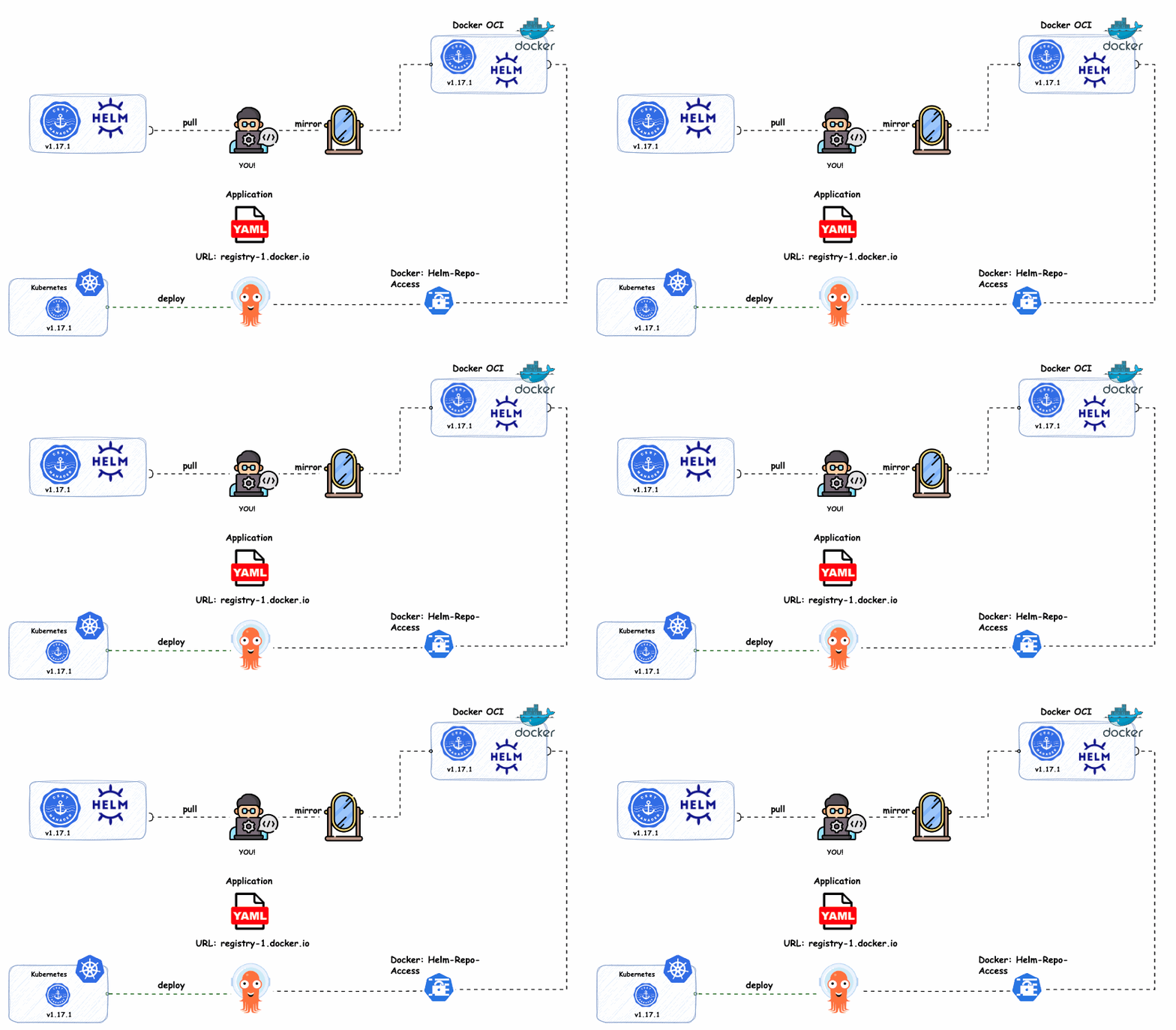
As Docker Hub introduces new rate limits, teams must find solutions to avoid Docker Hub limits and ensure stable deployments.
Starting April 1, 2025, Docker Hub will enforce strict pull rate limits:
- Unauthenticated users: 10 pulls per hour
- Authenticated users (free account): 100 pulls per hour
- Pro, Team, and Business users: Unlimited pulls
For teams and organizations relying on public Helm chart repositories, these new limits will cause deployment failures, throttling, and slower CI/CD pipelines.
The solution? Mirror and host Helm charts in a private Docker OCI Helm registry.
In this guide, we’ll show you how to:
✅ Set up a private OCI Helm repository in Docker Hub
✅ Push Helm charts to the private registry
✅ Integrate it with Argo CD to ensure uninterrupted deployments
Why You Need a Private OCI Helm Repository to Avoid Docker Hub Limits
Docker Hub’s new rate limits will significantly impact Helm chart pulls. As a result, these restrictions will cause failures in CI/CD pipelines. Therefore, teams must find alternatives to avoid disruptions.
If your pipelines frequently fetch charts from Jetstack, Bitnami, or other public sources, you could see:
❌ Deployment failures due to exceeded limits
❌ Increased latency in fetching charts
❌ Reduced reliability in production environments
By mirroring Helm charts to a private OCI repository, you:
✅ Avoid pull rate limitations
✅ Gain full control over availability and security
✅ Improve deployment performance
Now, let’s get started.
Docker OCI: Setting Up a Private OCI Helm Repository with Argo CD
In this section, we’ll go through the full process of:
- Creating a Personal Access Token (PAT) in Docker Hub.
- Pulling the Cert-Manager v1.17.1 Helm chart from Jetstack.io.
- Pushing the chart to a private Docker Helm OCI registry.
- Integrating it into Argo CD and deploying an application from the private repository.
Step 1: Generate a Personal Access Token (PAT) in Docker Hub
First, navigate to Docker Hub and create a Personal Access Token (PAT).
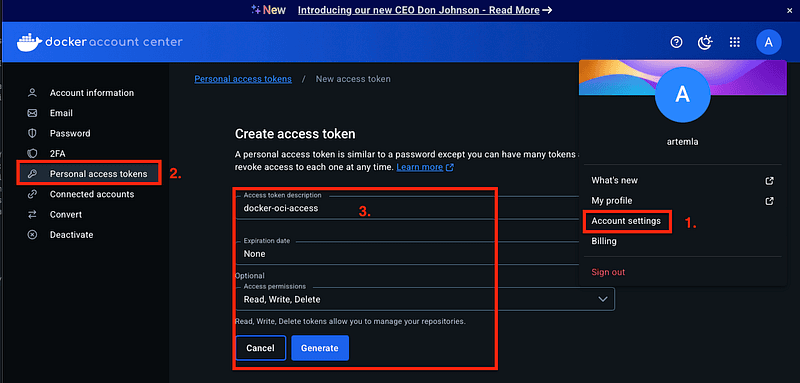
Copy the login command with your PAT and execute it locally:
docker login -u artemlaPassword:
Login SucceededStep 2: Pull the Cert-Manager Helm Chart from Jetstack
Now, let’s pull the Cert-Manager v1.17.1 Helm chart:
helm pull --version 1.17.1 --repo https://charts.jetstack.io cert-managerAfter running this, you should see the Helm chart package in your directory:
ls
cert-manager-v1.17.1.tgz
Step 3: Push the Helm Chart to a Private Docker Helm OCI Repository
Now, we push the Helm chart to our private Docker OCI registry:
helm push cert-manager-v1.17.1.tgz oci://registry-1.docker.io/artemlaImportant Notes
– You only specify the registry (artemla), not the full path (/artemla/cert-manager).
– The chart name is automatically extracted from its metadata, so Docker will create the correct repository structure.
Check if the push was successful by looking at the Docker UI:
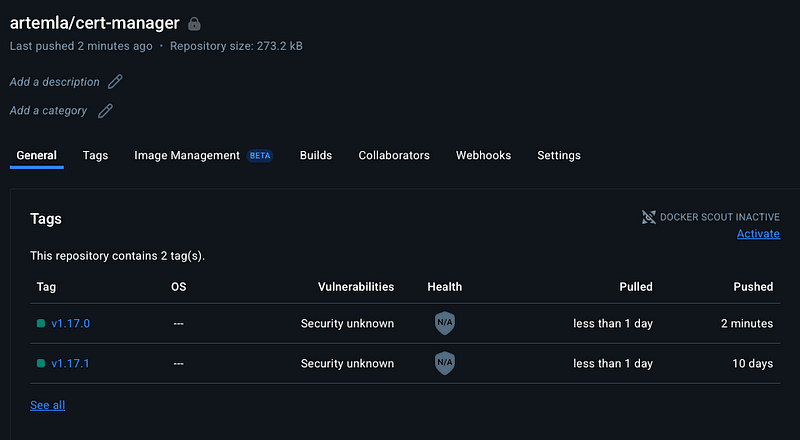
or by running:
helm pull oci://registry-1.docker.io/artemla/cert-manager --version v1.17.1Make sure to set your repository to private under Docker Hub repository settings!
Step 4: Add the Private Docker OCI Helm Repository to Argo CD
4.1 Add via Argo CD UI
- Navigate to Argo CD → Settings → Repositories.
- Click + CONNECT REPO and enter the following details:
- URL: registry-1.docker.io (⚠️ No /artemla at the end)
- Enable OCI: (Make sure to check this option)
3. Click CONNECT.
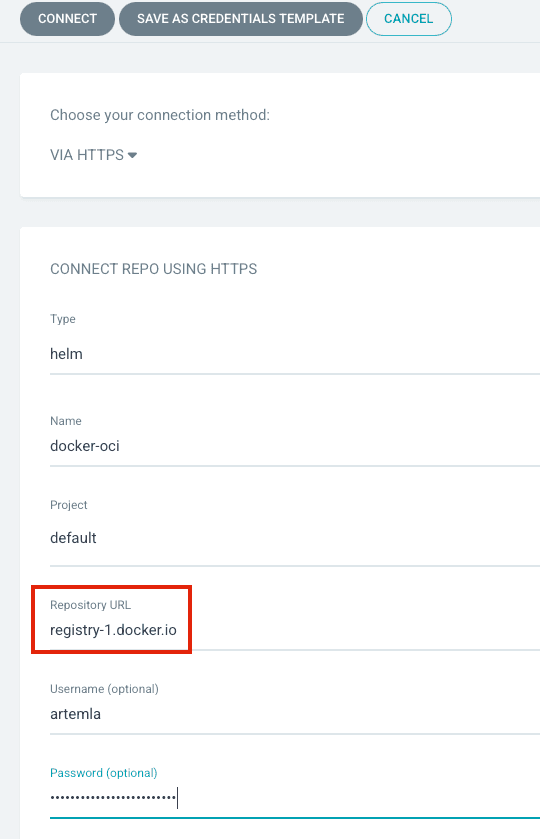
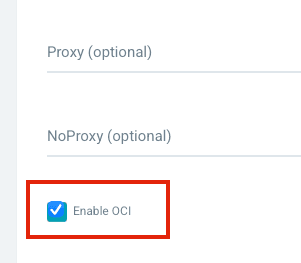
Now you should see something like this:

4.2 Add via CLI (Imperative Approach)
Alternatively, you can add the repository using kubectl by creating a Kubernetes Secret:
apiVersion: v1
data:
  enableOCI: dHJ1ZQ==
  name: ZG9ja2VyLW9jaQ==
  password: ZG.......
  project: ZGVmYXVsdA==
  type: aGVsbQ==
  url: cmVnaXN0cnktMS5kb2NrZXIuaW8=
  username: YXJ0ZW1sYQ==
kind: Secret
metadata:
  annotations:
    managed-by: argocd.argoproj.io
  labels:
    argocd.argoproj.io/secret-type: repository
  name: repo-2984550025
  namespace: argocd
type: Opaque
For a declarative approach, we recommend using External Secrets Operator or Sealed Secrets for secret management.
Step 5: Deploy Cert-Manager from the Private OCI Repository in Argo CD GUI
- Navigate to Argo CD → Applications.
- Click + NEW APP and fill in the form as follows:
- Repository URL:
registry-1.docker.io - Chart Name:
artemla/cert-manager - Version:
v1.17.1
3. Click CREATE.
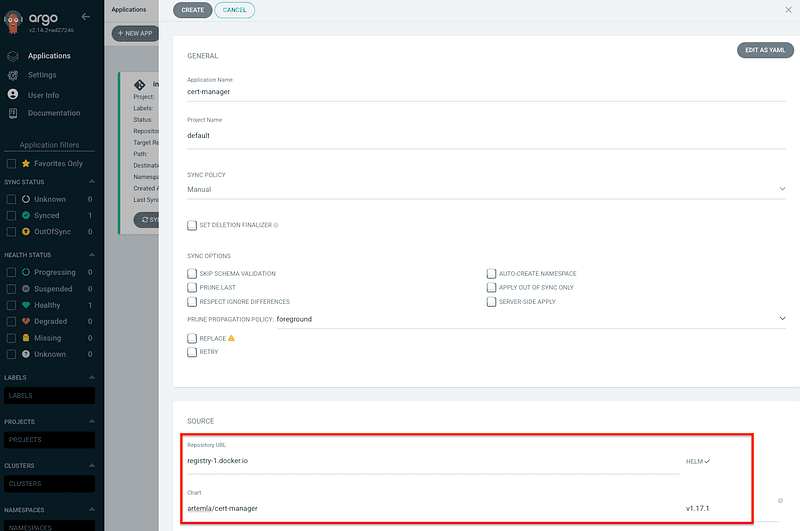
Argo CD should now show an “OutOfSync” status, meaning it can successfully pull the Helm chart from your private OCI registry.
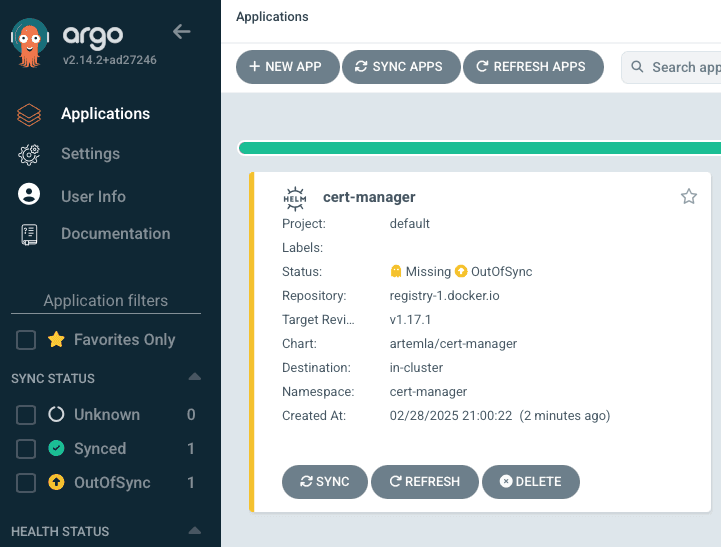
Application YAML Example
This is what the corresponding Argo CD Application YAML looks like:
apiVersion: argoproj.io/v1alpha1
kind: Application
metadata:
  name: cert-manager
  namespace: argocd
spec:
  destination:
    namespace: cert-manager
    server: https://kubernetes.default.svc
  project: default
  source:
    chart: artemla/cert-manager
    repoURL: registry-1.docker.io
    targetRevision: v1.17.1
  sourceType: Helm
This works for both ApplicationSets and Umbrella Charts.
No need for the passCredentials parameter when using OCI repositories.
Step 6 (Optional): Deploying with ApplicationSets and an Umbrella Helm Chart
For dynamic deployments, you can use ApplicationSets with a Cluster Generator:
apiVersion: argoproj.io/v1alpha1
kind: ApplicationSet
metadata:
  name: cert-manager
  namespace: argocd
spec:
  generators:
    - clusters:
        selector:
          matchLabels:
            cert-manager: enabled
        values:
          branch: main
  template:
    metadata:
      name: "{{name}}-cert-manager"
      annotations:
        argocd.argoproj.io/manifest-generate-paths: ".;.."
    spec:
      project: default
      sources:
        - repoURL: https://....
          path: "./cert-manager"
          targetRevision: "{{values.branch}}"
      destination:
        name: "{{name}}"
        namespace: "cert-manager"
      syncPolicy:
        syncOptions:
          - CreateNamespace=false
          - PruneLast=true
Or, if you’re working with Umbrella Helm Charts, here’s how you define it:
apiVersion: v2
name: cert-manager
description: Umbrella Chart for cert-manager
type: application
version: 0.0.1
dependencies:
  - name: artemla/cert-manager
    version: v1.17.1
    repository: "oci://registry-1.docker.io"
Final Thoughts
With Docker Hub’s new rate limits, teams must adapt to avoid disruptions in their Helm-based Kubernetes deployments.
By setting up a private OCI repository, you:
- Bypass Docker’s pull rate limits
- Ensure stable and fast Helm deployments
- Gain control over Helm chart security and compliance
Organizations using GitOps (Argo CD) can seamlessly integrate this setup for automated and scalable Helm deployments.
By using a private OCI Helm repository, you can avoid Docker Hub limits, improve security, and maintain control over Helm chart deployments.
Next Steps:
🔹 Mirror Helm charts and container images to your private Docker OCI registry via a CI/CD pipeline for better reliability and faster deployments.
🔹 Use Harbor or GitLab OCI if you need self-hosted alternatives to Docker Hub for enhanced control and security.
🔹 Implement Helm chart signing to ensure that only trusted and verified Helm charts are deployed in your Kubernetes clusters.
🔹 Enforce security policies with Kyverno to restrict deployments to signed Helm charts and container images only, preventing unauthorized or tampered artifacts from running in your environment.
🔹 Monitor Docker Hub usage and evaluate the impact of rate limits on your deployments to ensure uninterrupted workloads.
Authors:
– Alexander Hoeft
– Artem Lajko
Visit our other blogs!
Top 3 Questions:
- What are Docker Hub’s new pull rate limits?
- How can I avoid Docker Hub pull rate limits?
- How do I integrate a private OCI Helm repository with Argo CD?
About the author
A public speaker and a Senior Platform Engineer at iits-consulting. He specializes in GitOps and scaling Kubernetes platforms, with deep hands-on experience. A passionate advocate for open source, Alexander is particularly known for his expertise with Argo CD and for building reliable, secure, and scalable cloud architectures. On stage and in practice, he bridges strategy and engineering, helping teams adopt modern platform patterns and operate cloud-native systems with confidence.