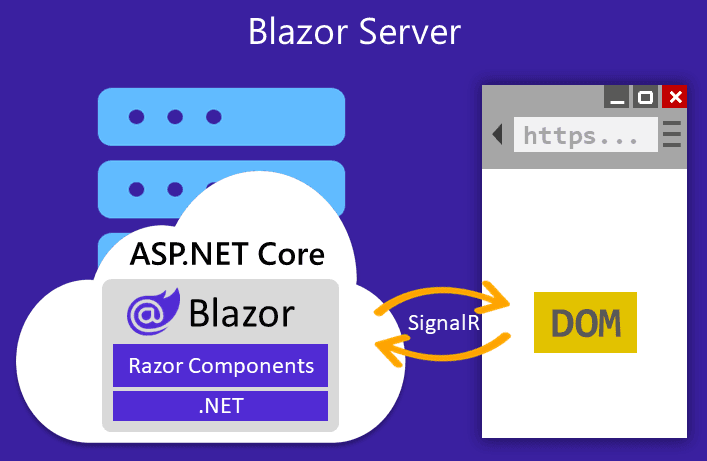
Blazor Server has a deployment problem, and it sits in the architecture. All communication between browser and server runs over a permanent WebSocket connection, and a user’s state lives in a circuit in the memory of that one process. When the process goes offline, the circuit will too.
That made every deployment a hard edge for active users, no matter how cleanly the rollout was built. The new server does not know the user’s circuit. The reconnect looks it up by its id and does not find it there. Anyone who was filling out a form starts over.
Until now the only way around it was to keep every relevant piece of state out of the circuit: in the URL, in local storage or in a database. That costs effort in places where it makes no sense from a domain point of view. A half typed comment does not belong in a database, url or should be stored anywhere else. Not to mention the user experience: after the connection loss the user has to reload the page by hand, because a fresh circuit takes the place of the old one.
.NET 11 gives us a mechanism for this. The server can ask every connected client to pause its circuit cleanly and take its state along. After that the process can disappear. Once the new server answers, the client connects again and sends its state back.
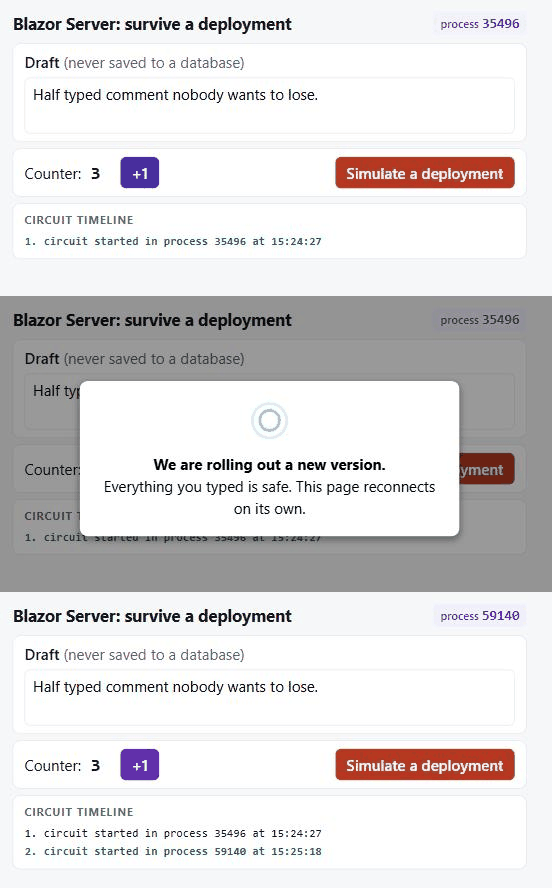
Here is the result. The counter and the half typed text stay while the process is swapped:
What .NET 10 prepared
.NET 10 brought circuit state persistence. Blazor can serialize the state of a circuit, throw the circuit away and build it back up later. Three pieces belong to it:
- The
[PersistentState]attribute on properties of components and of scoped services. That is how you mark what should survive. - The JS functions
Blazor.pauseCircuit()andBlazor.resumeCircuit(). - The
ReconnectModal, which ships as a real component in the template since .NET 10 and can be customized.
The catch: the pause had to come from the client. For a deployment that is the wrong direction. The server knows it is about to go away, the browser does not.
What .NET 11 adds
.NET 11 Preview 4 closes that gap with a single new method (PR #66455, design in issue #66244):
namespace Microsoft.AspNetCore.Components.Server.Circuits;

public sealed class Circuit
{
    public string Id { get; }

    public ValueTask<bool> RequestCircuitPauseAsync(
        CancellationToken cancellationToken = default);
}
That is the whole API surface. I built everything here with SDK 11.0.100-preview.6.26359.118.
The semantics of true matter: the message left for the client. The client is not paused yet at that point. You get false when the circuit is disposed, not initialized, or currently disconnected.
How the flow works
The comment in ComponentHub describes the graceful pause right in the source:
// * The client calls PauseCircuit, we dissasociate the circuit from the connection.
// * We trigger the circuit pause to collect the current root components and dispose the current circuit.
// * We push the current root components and application state to the client.
//   * If that succeeds, the client receives the state and we are done.
//   * If that fails, we will fall back to the server-side cache storage.
How the server triggers the pause:
- The server calls
RequestCircuitPauseAsync(). Blazor dispatches that onto the renderer dispatcher so it lines up with running renders and event handlers, and sendsJS.RequestPauseto the browser. - The client gets a last chance to clean up through the optional
onPauseRequestedcallback and then calls the hub methodPauseCircuit(). - The server collects root components and application state, encrypts both with Data Protection and sends them to the browser through
JS.SavePersistedState. - The circuit is disposed and the connection is closed.
- On resume the client calls
ResumeCircuit(circuitId, baseUri, uri, components, applicationState). The new server decrypts, rebuilds the root components and restores the state.
The key detail sits in step 3: the state ends up in the memory of the browser tab, in a private field of the Blazor client. No local storage, no session storage, no server session.
That is exactly why this works across a process change. On resume the server needs to know nothing about the old state, it gets it delivered. And that is exactly why F5 is the killer: a tab reload takes the state with it.
The server side cache that the docs describe around PersistedCircuitInMemoryMaxRetained and PersistedCircuitInMemoryRetentionPeriod is the fallback for an unplanned connection loss. For a deployment with a process restart a pure in-memory cache does not help, because it dies with the process.
The minimal repository
I built a Blazor Web App with Interactive Server that shows this flow:
PauseResumeDemo/
├── Program.cs                        host shutdown timeout, Data Protection, DI, /healthz, /admin/drain
├── Shutdown/
│   ├── CircuitShutdownService.cs     collects circuits, drains them
│   ├── ShutdownCircuitHandler.cs     CircuitHandler, hands over the Circuit instances
│   └── ShutdownCircuitOptions.cs     pause timeout
└── Components/
    ├── App.razor                     Blazor.start with onPauseRequested
    ├── Pages/Home.razor              [PersistentState] properties
    └── Layout/
        ├── ReconnectModal.razor      custom deployment UI
        ├── ReconnectModal.razor.css  visibility rules for the pause states
        └── ReconnectModal.razor.js   auto resume: poll /healthz, then resumeCircuit()
The host needs two settings
The host has to live long enough for the pause round trip to finish, so the shutdown timeout is larger than the pause timeout:
builder.Host.ConfigureHostOptions(options => options.ShutdownTimeout = TimeSpan.FromSeconds(30));
builder.Services.Configure<ShutdownCircuitOptions>(options => options.PauseTimeout = TimeSpan.FromSeconds(10));
Then there is Data Protection. The state is encrypted before it goes to the browser, and the circuit id is protected as well. On resume the server first parses the id and then decrypts the state, so a fresh process can read both only with the same key ring. Locally you never notice, because Data Protection puts the keys under $HOME/.aspnet/DataProtection-Keys. In a container the key ring is gone after a restart, and with it every chance of a resume:
builder.Services.AddDataProtection()
    .PersistKeysToFileSystem(new DirectoryInfo("/keys"))
    .SetApplicationName("PauseResumeDemo");
As soon as more than one instance is involved, a shared key store is mandatory, otherwise the client lands on an instance that cannot read its state.
Getting hold of the circuits
There is only one place where you get a Circuit instance, and that is the CircuitHandler. So that is where they are collected:
public sealed class ShutdownCircuitHandler(CircuitShutdownService shutdownService) : CircuitHandler
{
    public override Task OnConnectionUpAsync(Circuit circuit, CancellationToken cancellationToken)
    {
        shutdownService.Register(circuit);
        return Task.CompletedTask;
    }

    public override Task OnConnectionDownAsync(Circuit circuit, CancellationToken cancellationToken)
    {
        shutdownService.Unregister(circuit);
        return Task.CompletedTask;
    }
}
It gets registered as a scoped service, plus a singleton that holds the list:
builder.Services.AddSingleton<CircuitShutdownService>();
builder.Services.TryAddEnumerable(ServiceDescriptor.Scoped<CircuitHandler, ShutdownCircuitHandler>());
Drain and wait
The drain asks every circuit for a pause and then waits for them to actually disappear. The waiting is the important part, because RequestCircuitPauseAsync comes back right away:
public async Task DrainAsync(CancellationToken cancellationToken = default)
{
    _allCircuitsGone = new TaskCompletionSource(TaskCreationOptions.RunContinuationsAsynchronously);
    _isDraining = true;

    var circuits = _circuits.Values.ToArray();
    if (circuits.Length == 0)
    {
        return;
    }

    var accepted = await Task.WhenAll(
        circuits.Select(c => c.RequestCircuitPauseAsync(cancellationToken).AsTask()));

    _logger.LogInformation("Drain: {Accepted}/{Total} pause requests accepted.",
        accepted.Count(a => a), accepted.Length);

    await Task.WhenAny(_allCircuitsGone.Task, Task.Delay(_options.PauseTimeout, CancellationToken.None));
}
_allCircuitsGone is completed on the other side of the class, in Unregister. That is the path OnConnectionDownAsync from the CircuitHandler above calls as soon as a client drops its connection:
public void Unregister(Circuit circuit)
{
    _circuits.TryRemove(circuit.Id, out _);

    if (_isDraining && _circuits.IsEmpty)
    {
        _allCircuitsGone.TrySetResult();
    }
}
So the pausing client closes the connection itself, the CircuitHandler reports it, and with the last circuit gone DrainAsync continues. When the timeout runs out, the remaining clients see a normal connection loss. That is the honest price for letting a client defer the pause.
When the drain runs is the second half of the answer. In production it belongs before the stop signal, so in a Kubernetes preStop hook, in a pipeline step, or with deployment slots before the swap. The sample has an endpoint for it, and that endpoint has to stay private:
app.MapPost("/admin/drain", async (CircuitShutdownService shutdown, CancellationToken ct) =>
{
    await shutdown.DrainAsync(ct);
    return Results.Ok();
});
If you also want to hook into the process shutdown, the ordering matters: SignalR closes its own connections through IHostApplicationLifetime.ApplicationStopping as well, and CancellationToken callbacks run in reverse registration order. That is why the service registers its hook when the first circuit connects, which puts it in front of SignalR:
private void EnsureShutdownHookRegistered()
{
    lock (_hookLock)
    {
        if (_hookRegistered) return;
        _lifetime.ApplicationStopping.Register(() => DrainAsync().GetAwaiter().GetResult());
        _hookRegistered = true;
    }
}
A shutdown then reads like this in the log:
Drain: asking 1 circuit(s) to pause.
Drain: 1/1 pause requests accepted.
Circuit PUinOOn1ITG5... disconnected (0 left).
Drain: all circuits paused.
Application is shutting down...
Marking state
In the component one attribute is enough. I added a timeline that appends one entry per circuit with the process id:
@page "/"
@rendermode @(new InteractiveServerRenderMode(prerender: false))

<textarea @bind="Draft" @bind:event="oninput"></textarea>
<p>Counter: @Count <button @onclick="() => Count++">+1</button></p>

<ol>
    @foreach (var entry in Timeline!)
    {
        <li>@entry</li>
    }
</ol>

@code {
    [PersistentState] public string? Draft { get; set; }
    [PersistentState] public int Count { get; set; }
    [PersistentState] public List<string>? Timeline { get; set; }

    protected override void OnInitialized()
    {
        Timeline ??= [];
        Timeline.Add($"circuit started in process {Environment.ProcessId} at {DateTime.Now:HH:mm:ss}");
    }
}
After the deployment the list holds two processes, and counter and draft are unchanged:
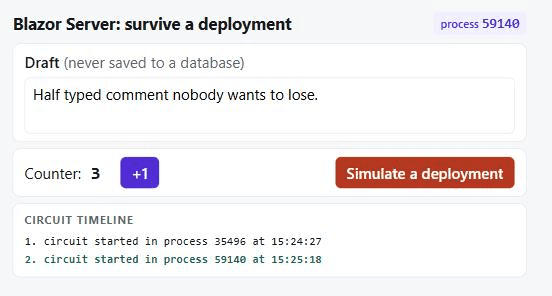
Two processes, one counter, no page reload, no database.
Custom UI for the deployment
Since .NET 10 the reconnect UI is a plain component in the template, and Blazor talks to it through CSS classes on the element with the id components-reconnect-modal plus one event. These are the states:
CSS class | detail.state | Meaning |
|---|---|---|
| | connection lost, reconnect is running |
| | another reconnect attempt |
| | the circuit is paused |
| | connected again |
| | reconnect failed |
| | resume failed |
| | the server refused |
The interesting part sits in the event detail. On paused Blazor also hands over a remote flag, and remote === true means this pause came from the server. That lets you tell a deployment UI apart from a plain pause:
case "paused":
    reconnectModal.classList.toggle("deployment-pause", event.detail.remote === true);
    if (event.detail.remote === true) {
        startAutoResume();
    }
    break;
In the markup two messages hang off the same visibility class, and the CSS decides which one is shown:
<p class="components-pause-visible pause-deployment">
    <strong>We are rolling out a new version.</strong><br />
    Everything you typed is safe. This page reconnects on its own.
</p>
<p class="components-pause-visible pause-manual">
    The session has been paused.
</p>
Now the UI tells the user what is actually going on:
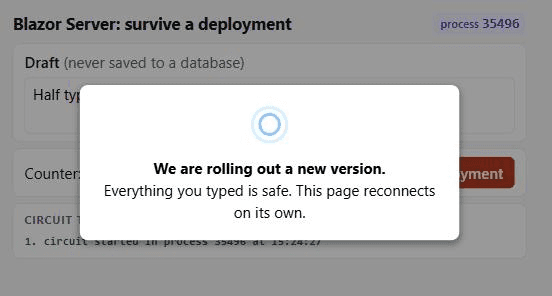
Auto resume in the client
After a graceful pause the client runs no retry loop, as we can see in the DefaultReconnectionHandler:
this.reconnectDisplay.show(displayOptions);
if (!this.isGracefulPause) {
  this.attemptPeriodicReconnection(options);
} else {
  this.reconnectDisplay.update({ type: 'pause', remote: this.isRemote });
}
So the default ReconnectModal shows „The session has been paused by the server.“ plus a resume button, and the user has to click. For a seamless experience this is not ideal. I used a small poller on a health endpoint that then calls Blazor.resumeCircuit():
async function startAutoResume() {
    const deadline = Date.now() + maxWaitMs;
    while (Date.now() < deadline) {
        await delay(pollIntervalMs);
        if (!(await serverIsBack())) {
            continue;
        }
        if (await resume()) {
            return;
        }
    }
    reconnectModal.classList.replace("components-reconnect-paused", "components-reconnect-resume-failed");
}

async function resume() {
    try {
        const successful = await Blazor.resumeCircuit();
        if (!successful) {
            // The server answered and the state is gone. A reload is the fastest way back.
            location.reload();
        }
        return true;
    } catch {
        return false;
    }
}
When resumeCircuit() returns false, the state is unusable on both sides, and a reload is the friendliest reaction. When the call throws, the server simply was not ready, so we keep trying.
Limits of the feature
I would not claim this feature is finished. A few points remain:
onPauseRequestedis preview API. Onmainthe callback has already been replaced bycircuitHandlers: [{ onCircuitPausing: signal => ... }], including anAbortSignal. If you build on it today, expect changes before GA.- Auto resume and auto pause on inactivity are missing from the framework. Both are planned for Preview 7 (issue #64886).
- Circuit state persistence only applies to the Interactive Server render mode.
- A page reload destroys the state.
- How much state survives is your call. Blazor persists exactly the properties marked with
[PersistentState]and nothing beyond that. Render tree and component instances are not serializable, so expanded tree nodes have to be modeled as app state yourself.
Even so, this is one of the more interesting Blazor Server feature in a long time. It improves on the render mode’s biggest flaw. A deployment now costs the user a few seconds of waiting, and their work stays.
TL;DR
Circuit.RequestCircuitPauseAsync()has been there since .NET 11 Preview 4 and lets the server request a graceful pause.- On a graceful pause the server pushes the encrypted state into the browser tab, and the client sends it back on resume. That is why it survives a process change, and why F5 kills it.
- Use
[PersistentState]to mark what should survive. - You reach the circuits through
CircuitHandler.OnConnectionUpAsync. - The drain belongs before the stop signal, so in a
preStophook, a pipeline step or before lifetime shutdown. - Put the Data Protection keys in shared storage and keep
ShutdownTimeoutlarger than the pause timeout. - Auto resume is on you right now: poll a health endpoint, then call
Blazor.resumeCircuit().
About the author
.NET Developer with more than 8 years of industry experience. I have worked on desktop applications ranging from WinForms to WPF, developed API services for B2B customer workflows, and built product prototypes using the first alpha release of the Blazor framework. Since then, I have invested thousands of hours in web development with Blazor, Angular, and other SPA frameworks. My greatest achievement to date has been leading the migration of a complex Product Information Management (PIM) system for a major omnichannel retailer from a custom-built solution to an industry-standard platform. The migration was completed without degrading or losing any existing workflows, while keeping all dependent systems synchronized throughout the process - with zero downtime.