
Why Migrate from ingress-nginx to Traefik Now?
If you’ve been following Kubernetes news, you know that Kubernetes is deprecating ingress-nginx. For many teams, this means an ingress-nginx to Traefik migration is now unavoidable. With the official retirement announced for March 2026, thousands of teams are facing a critical decision:
How to migrate your ingress infrastructure without breaking authentication and security?
For many organizations, ingress-nginx isn’t just routing HTTP traffic—it’s the foundation of their authentication layer using OAuth2 Proxy.
When we did this migration ourselves, we saw that Traefik markets itself as a “drop in replacement”. This is true if you only use simple HTTP/s Layer 7 resources. The situation changes, however, when OAuth2 authentication is involved.
This guide walks you through migrating a real-world setup from ingress-nginx to Traefik, keeping oauth2-proxy and GitHub OAuth in place. You’ll learn not just the configuration changes, but why Traefik’s approach differs — and how to architect a complete ingress-nginx to Traefik migration with OAuth2 proxy correctly.
What You’ll Learn
- How ingress-nginx and Traefik handle authentication differently
- Setting up oauth2-proxy with Traefik’s ForwardAuth middleware
- Converting nginx ingress annotations to Traefik middlewares
- Testing and verifying your OAuth2 flow works correctly
- Extending this pattern to protect multiple services
A Note on GitOps
In customer systems, we manage all these resources using GitOps. For clarity in this guide, the configurations are shown as standalone files and kubectl apply commands, but in practice, you’d commit these manifests to Git and let your GitOps tool handle the deployment and lifecycle management.
Prerequisites
Before we begin, you’ll need:
- A domain or subdomain: The examples use your-domain.com
- A GitHub OAuth App:
Go to GitHub Settings → Developer Settings → OAuth Apps Homepage URL: https://your-domain.com Authorization callback URL: https://your-domain.com/oauth2/callback Save the Client ID and Client Secret - A cookie secret: Generate with
openssl rand -base64 32 - A Kubernetes cluster with cert-manager and a ClusterIssuer configured for Let’s Encrypt (ACME)
Current Setup: ingress-nginx
Here’s a common pattern with ingress-nginx:
Architecture Overview
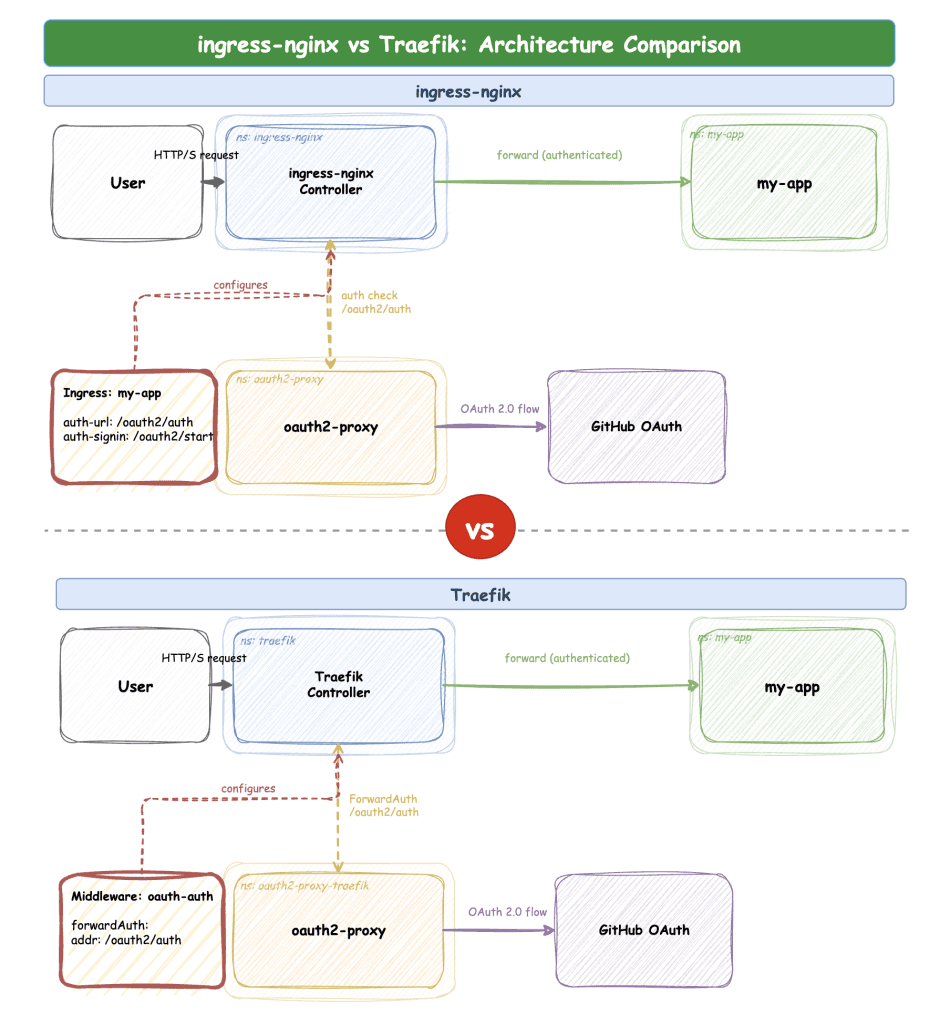
User → ingress-nginx → OAuth2 Proxy (authentication) → my-appIngress-nginx handles authentication through annotations directly on your application’s Ingress resource. The nginx controller intercepts requests, forwards them to oauth2-proxy for validation, and only passes authenticated requests to your app. It works because ingress-nginx recognizes those annotations. The controller translates them into the internal nginx configuration for the auth_request module.
The OAuth2 Credentials Secret
Your current nginx setup has a Kubernetes Secret with GitHub OAuth credentials:
apiVersion: v1
kind: Secret
metadata:
  name: oauth2-credentials
  namespace: oauth2-proxy
type: Opaque
data:
  client-id: <base64-encoded-github-client-id>
  client-secret: <base64-encoded-github-client-secret>
  cookie-secret: <base64-encoded-cookie-secret>
You’ll reuse these same credentials for the Traefik setup.
OAuth2 Proxy Configuration (ingress-nginx)
Here’s the oauth2-proxy Helm values for ingress-nginx:
# values-oauth2-nginx.yaml
config:
  existingSecret: oauth2-credentials
  configFile: |-
    reverse_proxy = true
    redirect_url = "https://your-domain.com/oauth2/callback"
    email_domains = [ "*" ]
    cookie_secure = true
    upstreams = [ "file:///dev/null" ]
    provider = "github"
    scope = "read:user user:email read:org"

ingress:
  enabled: true
  className: nginx
  path: /oauth2
  pathType: Prefix
  hosts:
    - your-domain.com
  annotations:
    cert-manager.io/cluster-issuer: letsencrypt-prod
  tls:
    - secretName: tls-oauth2-proxy
      hosts:
        - your-domain.com
This runs oauth2-proxy in authentication-only mode (via upstreams = [ “file:///dev/null” ]) – oauth2-proxy validates credentials while nginx handles routing.
my-app Ingress (ingress-nginx)
Here’s how you protect your application with nginx Ingress annotations:
apiVersion: networking.k8s.io/v1
kind: Ingress
metadata:
  name: my-app
  namespace: my-app
  annotations:
    cert-manager.io/cluster-issuer: letsencrypt-prod
    # These annotations enable OAuth2 authentication
    nginx.ingress.kubernetes.io/auth-signin: "https://$host/oauth2/start?rd=$escaped_request_uri"
    nginx.ingress.kubernetes.io/auth-url: "https://$host/oauth2/auth"
    # Enable port 80 -> 443 redirect
    nginx.ingress.kubernetes.io/force-ssl-redirect: "true"
spec:
  ingressClassName: nginx
  rules:
    - host: your-domain.com
      http:
        paths:
          - path: /
            pathType: Prefix
            backend:
              service:
                name: my-app
                port:
                  number: 80
  tls:
    - hosts:
        - your-domain.com
      secretName: tls-my-app
How it works:
- auth-url: nginx forwards auth requests to oauth2-proxy
- auth-signin: When authentication fails, redirect users here to start OAuth flow
- oauth2-proxy validates the session cookie or initiates GitHub OAuth
- Only authenticated requests reach my-app
This setup works great, but it’s tightly coupled to nginx-specific annotations.
The ingress-nginx to Traefik Migration
Traefik’s philosophy differs from ingress-nginx. Instead of handling everything through annotations, Traefik uses a modular approach with Middleware objects.
Architecture Overview
User → Traefik → ForwardAuth Middleware → OAuth2 Proxy → Traefik → my-appThe flow is slightly different: Traefik receives the request, delegates auth to oauth2-proxy via ForwardAuth, then routes the now-authenticated request onward.
A Note on IngressRoute vs Ingress
This guide uses standard Kubernetes Ingress resources, not Traefik’s IngressRoute CRD. Why?
Better portability and easier future migration to Gateway API. Both work with Traefik and can coexist, but Ingress keeps your configs portable across ingress controllers. See the “IngressRoute vs Ingress” section later for more details.
OAuth2 Proxy Configuration (Traefik)
For a safe parallel migration, deploy oauth2-proxy for Traefik in a separate namespace. This keeps both stacks isolated and makes rollback easy.
The oauth2-proxy configuration is nearly identical, with two key changes:
# values-oauth2-traefik.yaml
config:
  existingSecret: oauth2-credentials
  configFile: |-
    reverse_proxy = true
    redirect_url = "https://your-domain.com/oauth2/callback"
    email_domains = [ "*" ]
    cookie_secure = true
    upstreams = [ "static://200" ]  # ← Changed from file:///dev/null
    provider = "github"
    scope = "read:user user:email read:org"

ingress:
  enabled: true
  className: traefik  # ← Changed from nginx
  path: /oauth2
  pathType: Prefix
  hosts:
    - your-domain.com
  annotations:
    cert-manager.io/cluster-issuer: letsencrypt-prod
  tls:
    - secretName: tls-oauth2-proxy
      hosts:
        - your-domain.com
What changed:
- ingressClassName: traefik instead of nginx
- upstreams = [ “static://200” ] – This explicitly returns HTTP 200 for successful auth checks. Since oauth2-proxy is only validating authentication (not proxying traffic), you don’t need a real backend.
Understanding the upstreams setting
The upstreams configuration determines what oauth2-proxy does after validating authentication. If you set upstreams = [ “http://my-app:80” ], oauth2-proxy will proxy authenticated requests directly to my-app, bypassing Traefik’s routing entirely.
With upstreams = [ “static://200” ], oauth2-proxy validates authentication and returns HTTP 200 to Traefik. Traefik then routes the request to my-app based on the Ingress rules.
Note: If you come across upstreams = [ “file:///dev/null” ] in older documentation, that was the legacy approach. The static://200 pattern is more explicit and is now the recommended way to run oauth2-proxy in authentication-only mode.
ForwardAuth Middleware
Traefik requires a Middleware resource:
apiVersion: traefik.io/v1alpha1
kind: Middleware
metadata:
  name: oauth-auth
  namespace: oauth2-proxy-traefik
spec:
  forwardAuth:
    address: http://oauth2-proxy.oauth2-proxy-traefik.svc.cluster.local/oauth2/auth
    authResponseHeaders:
      - X-Auth-Request-User
      - X-Auth-Request-Email
      - Authorization
    trustForwardHeader: true
Configuration parameters:
- address: Internal Kubernetes service URL where Traefik sends auth requests
- authResponseHeaders: Headers to pass from oauth2-proxy to my-app
- trustForwardHeader: Trust the X-Forwarded-* headers (important for OAuth redirects)
my-app Ingress (Traefik)
Now my-app’s Ingress references the Middleware:
apiVersion: networking.k8s.io/v1
kind: Ingress
metadata:
  name: my-app
  namespace: my-app
  annotations:
    cert-manager.io/cluster-issuer: letsencrypt-prod
    # Reference the middleware - format: {namespace}-{middleware-name}@kubernetescrd
    traefik.ingress.kubernetes.io/router.middlewares: oauth2-proxy-traefik-oauth-auth@kubernetescrd
spec:
  ingressClassName: traefik
  rules:
    - host: your-domain.com
      http:
        paths:
          - path: /
            pathType: Prefix
            backend:
              service:
                name: my-app
                port:
                  number: 80
  tls:
    - hosts:
        - your-domain.com
      secretName: tls-my-app
Key annotation format: {namespace}-{middleware-name}@kubernetescrd
- oauth2-proxy-traefik = namespace where middleware is defined
- oauth-auth = middleware name
- Combined with hyphen: oauth2-proxy-traefik-oauth-auth
- @kubernetescrd = tells Traefik this is a CRD-based middleware
Key Differences: ingress-nginx vs Traefik
Aspect | ingress-nginx | Traefik |
|---|---|---|
Auth Configuration | Annotations on Ingress | Separate Middleware CRD |
Auth Flow | Built-in auth module | ForwardAuth middleware |
SSL Redirect | Annotation per Ingress | Can be global or per-middleware |
Configuration Style | Annotations (flat) | Middlewares (modular) |
Reusability | Copy annotations to each Ingress | Reference same Middleware |
Annotation Mapping: ingress-nginx → Traefik
ingress-nginx annotation | Traefik equivalent |
|---|---|
nginx.ingress.kubernetes.io/auth-url | forwardAuth.address in Middleware CRD |
nginx.ingress.kubernetes.io/auth-signin | Handled automatically by oauth2-proxy redirect |
nginx.ingress.kubernetes.io/force-ssl-redirect | Global redirectTo in Traefik Helm values |
kubernetes.io/ingress.class: nginx | ingressClassName: traefik |
Why Traefik Uses Middlewares
Traefik’s middleware approach has advantages:
- Reusability: Define the middleware once, reference it in multiple Ingresses
- Composability: Chain multiple middlewares (auth + rate limiting + headers)
- Clarity: Separation of concerns – routing vs processing
- Flexibility: Easy to enable/disable by removing annotation
Example of chaining middlewares:
annotations:
  traefik.ingress.kubernetes.io/router.middlewares: >-
    oauth2-proxy-traefik-oauth-auth@kubernetescrd,
    default-rate-limit@kubernetescrd,
    default-security-headers@kubernetescrd
Step-by-Step ingress-nginx to Traefik Migration Guide
Note: The following steps walk you through the full ingress-nginx to Traefik migration. This guide was written and tested with Traefik chart version 39.0.0 and oauth2-proxy chart version 10.1.3. The commands below install the latest versions, but you can pin to these tested versions by adding –version X.Y.Z if needed.
1. Install Traefik (Parallel to nginx)
helm repo add traefik https://traefik.github.io/charts
helm install traefik traefik/traefik -n traefik --create-namespaceNote: The Helm chart automatically creates an IngressClass named traefik for you.
Verify the installation:
# Check Traefik is running
kubectl get pods -n traefik

# Verify IngressClass was created
kubectl get ingressclass
# During migration, you should see both 'traefik' (new) and 'nginx' (existing)
Run both ingress controllers in parallel during migration. This allows you to test Traefik without disrupting existing traffic.
2. Configure cert-manager ClusterIssuer
Skip this step if you already have a ClusterIssuer configured.
Before deploying applications with TLS, you need a ClusterIssuer configured for automatic certificate provisioning. This ClusterIssuer works with Let’s Encrypt to automatically obtain and renew TLS certificates for your Ingress resources.
Prerequisites
Ensure cert-manager is installed in your cluster. If not, install it using Helm:
helm repo add jetstack https://charts.jetstack.io
helm repo update
helm install cert-manager jetstack/cert-manager \
  --namespace cert-manager \
  --create-namespace \
  --set crds.enabled=true
Create the ClusterIssuer for Let’s Encrypt production:
kubectl apply -f - <<EOF
apiVersion: cert-manager.io/v1
kind: ClusterIssuer
metadata:
  name: letsencrypt-prod
spec:
  acme:
    # Replace with your email address
    email: user@mail.com
    privateKeySecretRef:
      name: letsencrypt-prod
    server: https://acme-v02.api.letsencrypt.org/directory
    solvers:
    - http01:
        ingress:
          ingressClassName: traefik
EOF
Configuration notes
- email: Replace with your email address for Let’s Encrypt expiration notifications
- ingressClassName: This tells cert-manager to use Traefik for the HTTP-01 challenge
- The HTTP-01 solver creates temporary Ingress resources to prove domain ownership
Verify the ClusterIssuer is ready:
kubectl get clusterissuer letsencrypt-prod
# STATUS should show "True" in the READY column
Now when you create Ingress resources with the annotation cert-manager.io/cluster-issuer: letsencrypt-prod, cert-manager will automatically provision TLS certificates from Let’s Encrypt.
3. Deploy OAuth2 Proxy for Traefik
First, create the OAuth credentials Secret in the new namespace. Make sure to use the same values from your existing oauth2-credentials secret to ensure seamless transition:
kubectl create secret generic oauth2-credentials \
  -n oauth2-proxy-traefik \
  --from-literal=client-id=<your-github-client-id> \
  --from-literal=client-secret=<your-github-client-secret> \
  --from-literal=cookie-secret=<your-cookie-secret>
Deploy oauth2-proxy in a separate namespace to keep both stacks isolated during migration:
helm repo add oauth2-proxy https://oauth2-proxy.github.io/manifests
helm install oauth2-proxy oauth2-proxy/oauth2-proxy \
  -n oauth2-proxy-traefik \
  --create-namespace \
  -f values-oauth2-traefik.yaml
4. Create the ForwardAuth Middleware
kubectl apply -f - <<EOF
apiVersion: traefik.io/v1alpha1
kind: Middleware
metadata:
  name: oauth-auth
  namespace: oauth2-proxy-traefik
spec:
  forwardAuth:
    address: http://oauth2-proxy.oauth2-proxy-traefik.svc.cluster.local/oauth2/auth
    authResponseHeaders:
      - X-Auth-Request-User
      - X-Auth-Request-Email
      - Authorization
    trustForwardHeader: true
EOF
5. Update my-app Ingress
Create a new Ingress with ingressClassName: traefik:
kubectl apply -f - <<EOF
apiVersion: networking.k8s.io/v1
kind: Ingress
metadata:
  name: my-app-traefik
  namespace: my-app
  annotations:
    cert-manager.io/cluster-issuer: letsencrypt-prod
    traefik.ingress.kubernetes.io/router.middlewares: oauth2-proxy-traefik-oauth-auth@kubernetescrd
spec:
  ingressClassName: traefik
  rules:
    - host: your-domain.com
      http:
        paths:
          - path: /
            pathType: Prefix
            backend:
              service:
                name: my-app
                port:
                  number: 80
  tls:
    - hosts:
        - your-domain.com
      secretName: tls-my-app
EOF
6. Verify Middleware Configuration
Check that you have configured the Ingress and Middleware properly:
# Check the Ingress configuration and middleware annotation
kubectl describe ingress my-app-traefik -n my-app

# Check the Middleware ForwardAuth configuration
kubectl describe middleware oauth-auth -n oauth2-proxy-traefik

# Verify oauth2-proxy is running and ready
kubectl get pods -n oauth2-proxy-traefik
7. Switch DNS and Verify End-to-End
Get Traefik’s LoadBalancer IP and update your DNS:
# Get Traefik's LoadBalancer external IP or hostname
kubectl get svc -n traefik traefik
# Look for EXTERNAL-IP column (e.g., 203.0.113.42 or abc123.elb.amazonaws.com)
Update DNS manually: Go to your DNS provider (Cloudflare, Route53, etc.) and update the A record (or CNAME for cloud LoadBalancers) for your-domain.com to point to Traefik’s external address. Then wait for DNS propagation (usually 1-5 minutes).
Once that’s done, test the OAuth flow:
- 1. Open https://your-domain.com in a browser
- 2. You should be redirected to GitHub OAuth
- 3. After authorizing, you should land back at your application
- 4. Check that X-Auth-Request-User header is present in your app logs
8. Clean Up Old Resources
Once everything is working on Traefik:
# Delete the old nginx Ingress
kubectl delete ingress my-app -n my-app

# Optional: Clean up nginx-ingress and old oauth2-proxy once all apps are migrated
helm uninstall ingress-nginx -n ingress-nginx
helm uninstall oauth2-proxy -n oauth2-proxy
Optional: Migrate to clean namespace naming
The -traefik suffix was for parallel migration safety. If, however, you want clean naming, migrate oauth2-proxy back to the oauth2-proxy namespace:
# Delete the temporary namespace
kubectl delete namespace oauth2-proxy-traefik

# Redeploy oauth2-proxy in the original namespace
helm install oauth2-proxy oauth2-proxy/oauth2-proxy \
  -n oauth2-proxy \
  --create-namespace \
  -f values-oauth2-traefik.yaml

# Update the Middleware to point to the new Service location
kubectl apply -f - <<EOF
apiVersion: traefik.io/v1alpha1
kind: Middleware
metadata:
  name: oauth-auth
  namespace: oauth2-proxy
spec:
  forwardAuth:
    address: http://oauth2-proxy.oauth2-proxy.svc.cluster.local/oauth2/auth
    authResponseHeaders:
      - X-Auth-Request-User
      - X-Auth-Request-Email
      - Authorization
    trustForwardHeader: true
EOF

# Update my-app Ingress annotation to reference the new Middleware location
# Change: oauth2-proxy-traefik-oauth-auth@kubernetescrd
# To: oauth2-proxy-oauth-auth@kubernetescrd
IMPORTANT: This requires brief re-authentication for users.
Troubleshooting
Redirect loop
# Ensure cookie_secure matches your TLS setup
cookie_secure = true  # Use only with HTTPS
404 on /oauth2/callback
# Verify oauth2-proxy Ingress exists
kubectl get ingress -n oauth2-proxy-traefik
kubectl describe ingress oauth2-proxy -n oauth2-proxy-traefik
“Invalid redirect URI” from GitHub
- Ensure GitHub OAuth App callback URL exactly matches: https://your-domain.com/oauth2/callback
- No trailing slashes!
Checking Logs
When troubleshooting, check the logs:
# View Traefik logs
kubectl logs -n traefik deployment/traefik -f

# View oauth2-proxy logs
kubectl logs -n oauth2-proxy-traefik deployment/oauth2-proxy -f
Protecting Multiple Services with Traefik
Traefik’s Middleware approach allows you to define authentication once and reuse it across all services.
Protect Multiple Apps
# app1
apiVersion: networking.k8s.io/v1
kind: Ingress
metadata:
  name: app1
  namespace: app1
  annotations:
    traefik.ingress.kubernetes.io/router.middlewares: oauth2-proxy-traefik-oauth-auth@kubernetescrd
spec:
  ingressClassName: traefik
  rules:
    - host: your-domain.com
      http:
        paths:
          - path: /app1
            pathType: Prefix
            backend:
              service:
                name: app1
                port:
                  number: 80
---
# app2
apiVersion: networking.k8s.io/v1
kind: Ingress
metadata:
  name: app2
  namespace: app2
  annotations:
    traefik.ingress.kubernetes.io/router.middlewares: oauth2-proxy-traefik-oauth-auth@kubernetescrd
spec:
  ingressClassName: traefik
  rules:
    - host: your-domain.com
      http:
        paths:
          - path: /app2
            pathType: Prefix
            backend:
              service:
                name: app2
                port:
                  number: 80
Both apps share the same OAuth2 authentication with a single Middleware definition.
Additional Considerations
SSL Redirect with Traefik
With nginx, you added force-ssl-redirect: “true” to each Ingress. Traefik handles this globally via Helm values:
# values.yaml for Traefik Helm chart
ports:
  web:
    redirectTo:
      port: websecure
This redirects all HTTP → HTTPS at the entrypoint level. If you need per-Ingress control instead, create a redirect Middleware and reference it with the traefik.ingress.kubernetes.io/router.middlewares annotation.
IngressRoute vs Ingress
Traefik supports both standard Kubernetes Ingress and its own IngressRoute CRD. This guide uses Ingress, and you can use both resource types together if needed.
Why this guide uses Ingress
- Future-proofing: Gateway API is the official successor to Ingress (Kubernetes SIG-Network). Migrating from Ingress to Gateway API is well-defined and standardized. Migrating from IngressRoute to Gateway API requires translating Traefik-specific concepts.
- Portability: Ingress works with any ingress controller. If you ever switch from Traefik, you don’t need to rewrite your routing configs. IngressRoute locks you into Traefik.
- Simplicity: Ingress is the standard Kubernetes resource that most teams already understand.
When to consider IngressRoute:
If you need advanced features like TCP/UDP routing, complex routing rules, or native Traefik syntax right now. You can use IngressRoute for those specific services while keeping the rest on Ingress. Both resources coexist without issues.
Conclusion
An ingress-nginx to Traefik migration isn’t a simple annotation swap, especially with OAuth2 authentication involved. Specifically, there are three key differences:
- Middleware architecture: Traefik’s modular approach requires creating separate Middleware CRDs
- ForwardAuth pattern: Explicit configuration of the auth flow
- Annotation format: Different syntax for referencing middlewares
But once you understand these patterns, the ingress-nginx to Traefik migration pays off — Traefik’s approach is actually more flexible and reusable.
Resources
About the author
A public speaker and a Senior Platform Engineer at iits-consulting. He specializes in GitOps and scaling Kubernetes platforms, with deep hands-on experience. A passionate advocate for open source, Alexander is particularly known for his expertise with Argo CD and for building reliable, secure, and scalable cloud architectures. On stage and in practice, he bridges strategy and engineering, helping teams adopt modern platform patterns and operate cloud-native systems with confidence.